Aspera User Guide
Overview
Aspera is a data transfer technology that can significantly reduce the time taken to transfer data over long distances. Monash collections can be made accessible through the Monash eResearch Aspera Shares server so that any group with distant members can use a web browser to access data.
Quick Start
-
To request an account or to have your storage allocation made accessible using the Aspera service, open a support ticket by emailing the RDS team with your specific requirements: merc-rdsm-support@monash.edu
-
When your request has been processed, you will receive an email notification with further instructions
-
Log in to Aspera Shares: https://shares.erc.monash.edu/
If you are not automatically redirected to the Monash login portal, click the following link below the form:
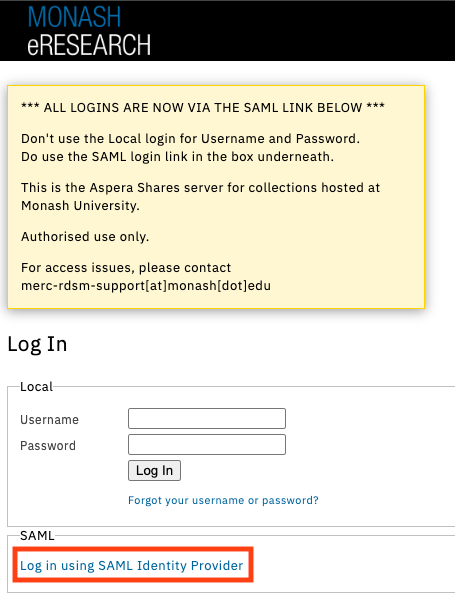
- To enable uploads and downloads between your desktop and your allocations you will need to install additional software. See the next section.
Installing and Configuring Aspera Connect
Aspera Shares requires the installation of two pieces of software to enable high-speed transfers between your desktop and the server:
- The Connect browser extension
- Aspera Connect client
The following steps will guide you through this process for Monash University:
-
Ensure you have an account and an accessible allocation
-
Log in to Aspera Shares
-
Select your share folder from the left side of the screen
-
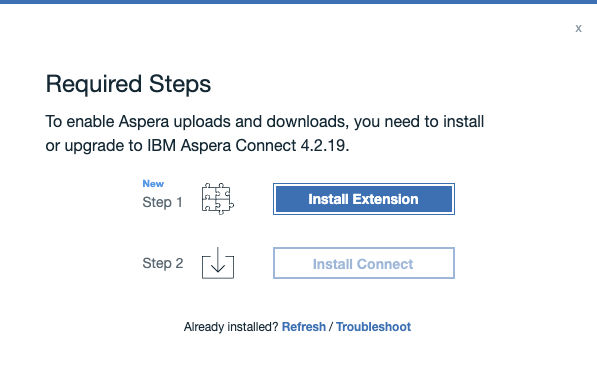
A pop-up dialog will prompt you to install the required software:
-
Follow the installer instructions. You may need to grant approval to the installer in order for the process to succeed
-
When you return to the share on the Aspera Shares server, you will be prompted to Allow your browser to use the Aspera browser extension
-
You are now ready to use Aspera in your web browser
Uploading and Downloading Files Using Aspera Connect
- Log in to Aspera Shares
- Select the share you would like to access from your list of shares
- You will now be able to upload, download, sort and search folders and files in an allocation.
- Be aware that not all users have all rights
- You may need to discuss specific access rights with the collection owner

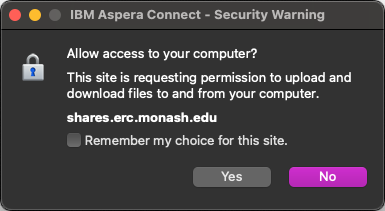
- The first time you perform an action, like download or upload a file, you will need to authorise the action:
Support
Email: merc-rdsm-support@monash.edu